Cymatics VOXITY 1.0.0 (macOS)
One download for Apple Silicon and Intel. Opens the install steps and mirrors.
- Version
- 1.0.0
- Size
- 97 MB
- Earliest macOS
- 10.14 or later
- CPU type
- Universal
- Updated
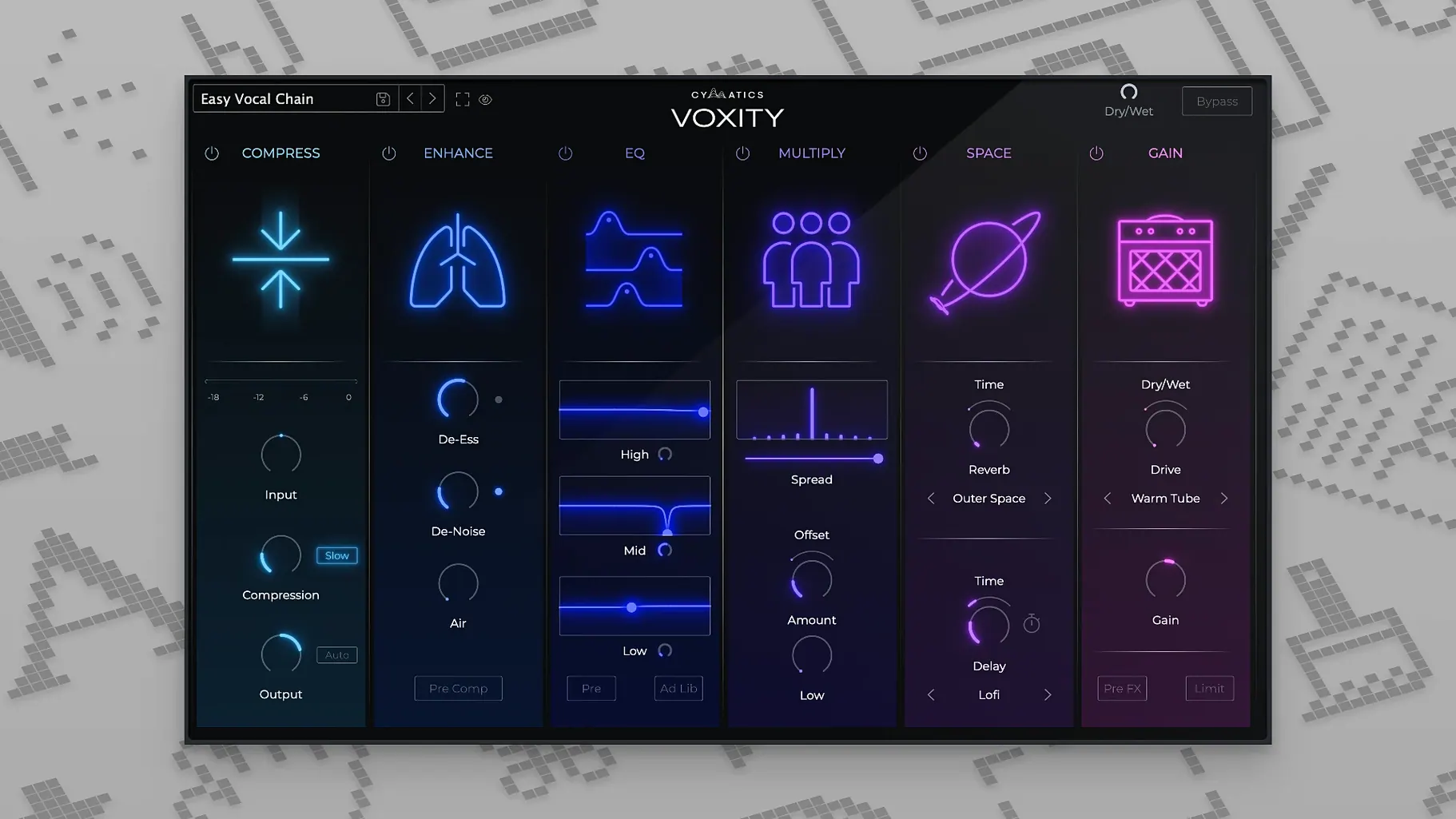
Voxity sits in a similar space to iZotope Nectar or Antares Auto-Tune Pro — a single-window vocal processing plugin that does the common jobs without opening a rack of separate plugins. Made by Cymatics, it handles reverb, echo, de-essing and breath reduction inside one interface, which saves time on basic vocal cleanup.
Reduces harsh sibilance and breathing noise
- Reducing harsh sibilance and breathing noise from raw vocal takes
- Adding reverb and echo without routing to auxiliary sends
- Quick, one-plugin vocal polishing on a single track
Requires macOS 10.14 or later, English-only interface
- Interface is English only
- Requires macOS 10.14 or later, 64-bit host
- Runs on both Intel and Apple Silicon Macs
- Version 1.0.0 — early release, so expect fewer presets than established competitors
Suits home studio producers recording in untreated rooms
A producer who records vocalists in a home studio — say, a bedroom pop or lo-fi hip-hop setup — will find Voxity useful. You record a singer in an untreated room; the take has a little rumble from an air conditioner, some sibilance on the S's, and a touch of reverb you did not intend. Normally you would reach for a de-esser, a gate, an EQ and a reverb plugin across four inserts. With Voxity you drop one instance on the channel, pick a preset and adjust two or three sliders. It will not fix a bad room or a poor microphone, but it cuts the number of plugins you need to touch before the vocal sits in the mix.
Mix engineers who work on pop or EDM vocals might also use it as a first-pass processor before more specialised tools. The stereo widening and brightness controls give a sheen that works well for lead vocal layers in electronic music.
Avoid over-processing the breath reduction
- Over-processing the breath reduction. The breath gate can grab the natural air between phrases and flatten the vocal. Start with low settings and only increase if the breaths actually distract.
- Ignoring the input level. Like any dynamics-based plugin, Voxity's behaviour changes if you feed it a quiet signal. Make sure the vocal track peaks near -6 dB to -3 dB before the plugin, or the reverb and compression will sound thin.
- Relying on presets without listening to the original take. A preset designed for a bright pop vocal will sound wrong on a warm jazz recording. Cycle through presets but always listen back and adjust the individual controls.
- Adding reverb in Voxity and then adding more reverb on the same track later. The plugin already includes its own reverb tail. If you send the track to a hall reverb bus as well, the result can be muddy. Choose one place for reverb, not both.
Checks compatibility with your DAW before installing
Runs as a standalone insert without conflicts
No. Voxity is a standalone plugin that processes only the channel you insert it on. It does not interact with other plugins unless you route audio through it. You can bypass it by turning it off in your host DAW.
Designed as an insert, not a send effect
The plugin is designed as an insert effect. Reverb and echo inside Voxity are part of its own processing chain. If you need a send-style reverb (so you can blend dry and wet signals from multiple channels), use a dedicated reverb plugin instead.
Works as a standard VST3 and AU plugin in major DAWs
It is a standard VST3 and AU plugin, so it will load in any major DAW that supports those formats — Logic Pro, Ableton Live, FL Studio, Cubase, Reaper, GarageBand. On macOS the AU version is usually the simplest route for Logic users. Check your DAW's plugin folder after installation; the plugin should appear in the standard directory.
Do I need admin rights to install it?
Most likely yes, because the installer writes to system-level plugin folders. If you are on a school or work Mac, you may need an administrator password. On a personal Mac you can install with your own account if it has standard user permissions.
Handles vocal-specific jobs other suites do not cover
Voxity sits alongside your existing plugin collection. It does not replace a full mixing suite like iZotope Ozone or FabFilter, but it handles the vocal-specific jobs those suites do not cover. For example, you might use Voxity for de-essing and reverb, then route the output to a compressor or EQ for more precise shaping. Many producers set it as the first insert on a vocal track before anything else.
The plugin also works with macOS features such as QuickTime export or screen recording — if you need to demonstrate a preset to a collaborator, you can capture the audio directly within your DAW and export it as an MP3 or WAV with no extra routing. It does not require a hardware dongle or iLok, so it travels on a laptop easily.
If you are on an Apple Silicon Mac, Voxity runs natively in 64-bit mode without Rosetta translation — something worth checking for any plugin if you want to keep latency low during tracking sessions.
No “what's new” for 1.0.0. The release line gave nothing I could check, and I will not stretch it into a changelog.
- macOS 10.14 or later
- 64-bit host
- Intel or Apple Silicon
Questions people ask
Does Voxity run on Apple Silicon Macs?
Yes, the plugin supports both Intel and Apple Silicon architectures natively.
What does Voxity do that a standard DAW reverb cannot?
It combines de-essing, breath reduction, echo and reverb in one plugin, so you can clean and shape a vocal without inserting multiple effects.
Staffroom comments 0
Sign in or create an account here to leave a comment.
Nobody has commented on this one yet.
Other VST Plugins tools
All VST Plugins tools-
 Devious Machines Infiltrator
2.5.26
46 MB
VST Plugins
-
 elastiquePitch
2.5.0
17 MB
VST Plugins
-
 EZbass
1.3.3
81 MB
VST Plugins
-
 EZdrummer
3.1.2
786 MB
VST Plugins
-
 Bogren Digital Ampknob BDH 66o6 Plus
1.2.118
253 MB
VST Plugins
-
 Arturia FX Collection
2026.02
16.1 GB
VST Plugins
-
 Arturia Efx AMBIENT
1.0.0
285 MB
VST Plugins
-
 Arturia Analog Lab V
5.12.6
2 GB
VST Plugins