
EZbass 1.3.3 (macOS)
One download for Apple Silicon and Intel. Opens the install steps and mirrors.
- Version
- 1.3.3
- Size
- 81 MB
- Earliest macOS
- 10.15 or later
- CPU type
- Universal
- Updated
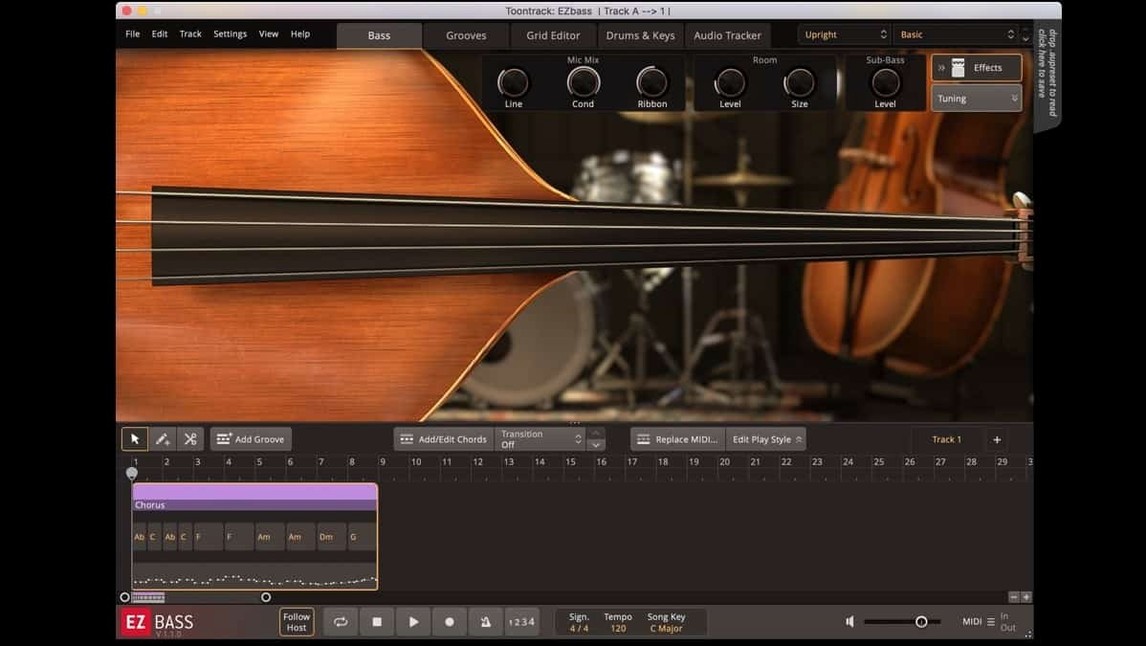
Producers, composers and anyone who needs a bass part without picking up a real instrument.
Runs on Intel and Apple Silicon natively
Plugin format — VST, AU, AAX. Runs as a standard instrument plugin inside a DAW or host that supports those formats.
macOS support — 10.15 and later. Both Intel and Apple Silicon natively.
Version 1.3.3 fixes — Menu click response issues in newer Apple hosts. Mac icons updated to macOS Tahoe style.
Interface language — English.
The sound and what it does
Sampled basses — Two instruments: one vintage, one modern. Both are sampled, not synthesised.
Built-in MIDI — Bass MIDI covering a broad range of styles. Enough to build a part quickly or to use as a starting point.
Audio-to-MIDI — Drop in an audio bass line and get MIDI out. Useful for re-amping or tweaking a recorded part.
Right-hand mute articulation — Added in 1.3.3. Works with the Rock Legend EBX bass library.
Keyboard shortcuts — Some can now be changed in the Settings section.
A typical workflow: building a bass part from scratch
Start with a blank session in your DAW and instantiate EZbass on a new instrument track. Load one of the two basses — say the modern one for a pop or rock song.
Open the built-in browser and pick a style that matches your track. The MIDI library is organised by genre and feel, so you can audition several patterns without dragging anything to the timeline.
Once you find a pattern that works, drag it onto the EZbass track. The plugin generates a bassline that follows the pattern. You can then use the built-in editor to tweak notes, alter the rhythm or change the articulation.
If your track already has a drum or keyboard MIDI part, drag that into EZbass instead. The engine analyses the MIDI and creates a bassline that fits the harmonic and rhythmic content. This is a faster route than writing from the grid.
For a recorded audio bass line that needs reworking, use the audio-to-MIDI conversion. Drop the audio onto the plugin. The conversion is the same tech used in Superior Drummer 3. The resulting MIDI can be edited or re-assigned to a different EBX expansion.
Export the final bass part as audio or MIDI from the plugin and commit it to your DAW timeline.
Takes a different approach from key-switch libraries
EZbass vs. IK Multimedia MODO BASS
MODO BASS is physically modelled — no samples. You get a continuously variable sound that responds to every playing nuance, but it can sound less immediately polished than a sampled instrument. EZbass gives you two carefully sampled instruments out of the box. MODO BASS offers more tonal variation through modelling; EZbass relies on its EBX expansion libraries for new sounds. The workflow in EZbass is faster for songwriters who want a part quickly, while MODO BASS rewards deeper programming.
EZbass vs. Native Instruments Scarbee R.I.P.
Scarbee R.I.P. samples a single vintage bass. It sounds excellent and has a stripped-back interface, but it lacks the MIDI generation and audio-to-MIDI conversion that EZbass includes. If you need a bassline written for you or need to rework an existing track, EZbass is the more complete tool. Scarbee R.I.P. is a sample player, not a composition assistant.
EZbass vs. Logic Pro Bass (session players)
Logic Pro Bass is tied to a single DAW and works only on macOS. EZbass runs in any DAW that supports VST, AU or AAX. Logic’s session player bass is convenient for Apple users but has no EBX expansions and limited editing tools inside the plugin. EZbass’s MIDI library and editor give you more control over the part before it reaches the DAW.
Lets you reassign keyboard shortcuts to match your DAW
- Keyboard shortcuts — Version 1.3.3 lets you reassign some shortcuts in the Settings section. Set them to match your DAW’s conventions to avoid conflict.
- Audio-to-MIDI threshold — Adjust this in the conversion panel if the generated MIDI includes notes that are too quiet or too late. Lowering the threshold catches more detail.
- EBX expansion loading — If you own Rock Legend EBX or another library, check that it loads as the default instrument. Saves time when you always start with a particular sound.
- Output routing — If your DAW allows multi-output plugin routing, set EZbass to send separate articulations or mics to separate channels. This gives you more mixing flexibility later.
- Added support for right-hand mute articulation used in Rock Legend EBX.
- Added support for changing some keyboard shortcuts in Settings.
- Updated Mac icons to macOS Tahoe style.
- macOS 10.15 or later
- Intel or Apple Silicon processor
Staffroom comments 0
Sign in or create an account here to leave a comment.
Nobody has commented on this one yet.
Other VST Plugins tools
All VST Plugins tools-
 EZdrummer
3.1.2
786 MB
VST Plugins
-
 elastiquePitch
2.5.0
17 MB
VST Plugins
-
 Devious Machines Infiltrator
2.5.26
46 MB
VST Plugins
-
 Cymatics VOXITY
1.0.0
97 MB
VST Plugins
-
 iZotope Insight
2.4.0
VST Plugins
-
 iZotope RX
12.1.0
3.6 GB
VST Plugins
-
 iZotope Tonal Balance Control
3.0.0
264 MB
VST Plugins
-
 Bogren Digital Ampknob BDH 66o6 Plus
1.2.118
253 MB
VST Plugins