
Flicker Free 2.1.6 (macOS)
- Version
- 2.1.6
- Size
- 24 MB
- CPU type
- Universal
- Updated
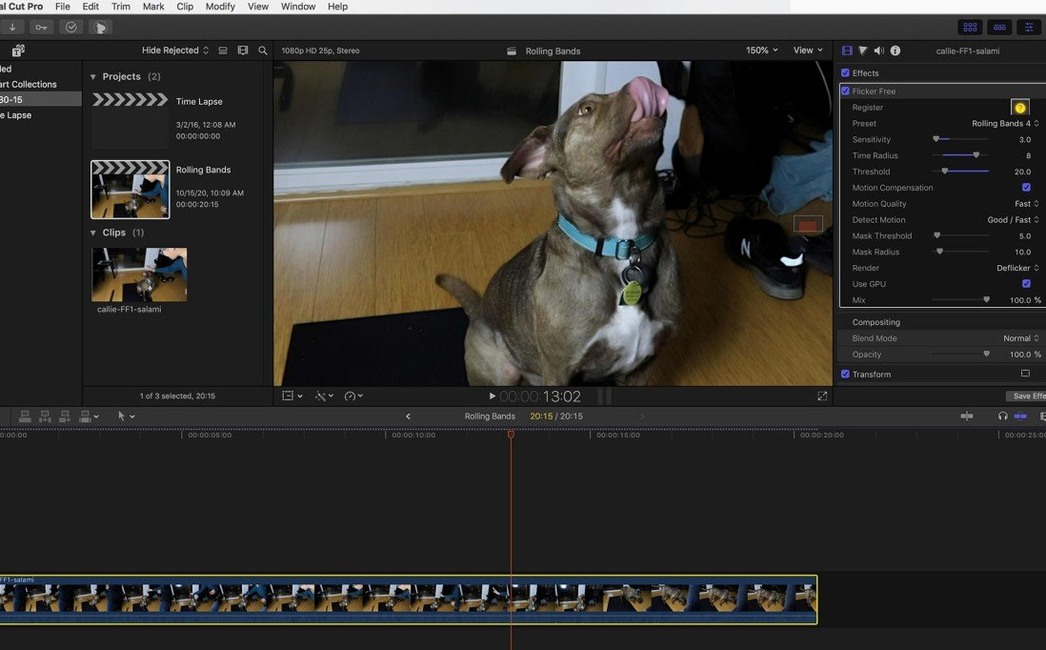
Flicker in video footage is a persistent nuisance. Fluorescent lights, mismatched shutter speeds, or a computer monitor in shot can all leave you with a constant pulsing artefact that ruins the edit. The fix needs to be surgical, not blunt.
Manual tweaks give you frame-by-frame control
- Presets for a fast start, but the real power is in manual tweaking – you control the analysis window and correction strength.
- Frame-by-frame analysis happens during processing, not as a pre-render step. That means you can adjust parameters and see the result immediately on the timeline.
- Handles the difficult stuff: high-frame-rate slow motion, where flicker is often worse, and footage with computer monitors in frame.
- Works as a plugin across Final Cut Pro, After Effects, Premiere Pro, Avid, DaVinci Resolve, and any OpenFX host.
What it actually does
Flicker Free 2.1.6 analyses each frame as it is rendered and applies a correction that adapts to the flicker frequency. It is not a blanket filter – it targets the specific pulse pattern in your footage, whether that comes from a 50 Hz or 60 Hz source. It is a focused tool for a specific problem, and it does that one job well.
Stays inside your host app as a filter
Flicker Free sits as a plugin inside your host application. It does not need a separate window or a round trip through another piece of software. Apply it as a filter on a clip or a group of clips, tweak the parameters, and render a short test section before committing to the full timeline. This keeps your project file self-contained and avoids the organisational mess of exporting and re-importing corrected footage.
The plugin respects your host app's colour space and project settings. It works on the frame data as it passes through the render pipeline, so you can stack it with other effects in After Effects or place it on a clip in Premiere Pro's effect panel. In DaVinci Resolve it appears in the OpenFX library alongside other third-party tools.
Using it with time-lapse and slow-motion
Time-lapse sequences often have flicker because the camera's exposure changes slightly between frames, especially under artificial light. Flicker Free's preset for timelapse handles this in one pass. For high-frame-rate footage from a Phantom Flex or Sony FS700U, the rolling flicker from LED or fluorescent sources can be harder to spot until you play back at normal speed. The plugin's analysis adapts to the higher frame count and keeps the correction consistent across the clip.
Trade-offs: pre‑render analysis vs. real‑time adjustment
There are several ways to remove flicker on a Mac, and each has its trade-offs.
Flicker Free vs. built-in deflicker tools
Final Cut Pro and Premiere Pro both include basic flicker reduction filters. These work well for minor flicker from a single light source, but they struggle with the rolling flicker you get from LED panels or computer monitors. Flicker Free's preset system and manual adjustment give you more control over the analysis window, which matters when the flicker frequency changes during a shot.
Flicker Free vs. Neat Video
Neat Video is a noise reduction tool that also includes a flicker reduction module. It is a broader product – it handles grain, compression artefacts and sensor noise as well. The flicker correction in Neat Video works, but it is part of a larger processing pipeline. Flicker Free is lighter and faster for a pure flicker fix. You load it, choose a preset, render a test, and you are done. Neat Video is the tool to reach for when you need noise and flicker fixed together; Flicker Free is the one to use when the flicker is the only problem.
Flicker Free vs. Adobe After Effects deflicker scripts
There are free and paid scripts for After Effects that attempt to remove flicker by averaging frames or applying a temporal median. These can work on simple footage, but they often introduce motion blur or soften the image. Flicker Free's per-frame analysis preserves sharpness and handles the changing frequencies you get from rolling shutter artefacts. It also works across more host applications than a dedicated AE script.
Plugin missing? Check the OpenFX folder path
- The plugin does not appear in the host app's effects list. Check that the installer placed the Flicker Free files in the correct plugin folder for your app. For DaVinci Resolve, the OpenFX folder is usually in
/Library/Application Support/Blackmagic Design/DaVinci Resolve/Support/LUTor similar. For After Effects and Premiere Pro, the plugin goes in thePlug-insfolder. If the install instructions mention an activation step, run that before launching the host app. - The correction looks wrong or introduces artefacts. This usually means the analysis window is too small or the correction strength is too high. Reduce the strength setting and test a short section.
- Flicker is still visible after applying the plugin. The preset might not match the exact flicker pattern in your footage. Switch to manual mode and adjust the analysis window. Render a test of a few seconds before applying the full correction.
- Performance is slow on longer clips. Flicker Free analyses each frame during the render, so a long 4K clip will take time. Render a short test section first. If the result is correct, cancel the full render and apply the same settings to the whole clip – the analysis will run again, but you avoid waiting through a full render of a test.
- The plugin crashes or fails to apply. Make sure you are running version 2.1.6 on a supported macOS version. If you moved the plugin files manually, the host app might not have permission to read them. Check the file permissions in the plugin folder.
No “what's new” for 2.1.6. The release line gave nothing I could check, and I will not stretch it into a changelog.
- macOS (exact version not specified by developer)
- Intel or Apple Silicon
- Interface language: English
Staffroom comments 0
Sign in or create an account here to leave a comment.
Nobody has commented on this one yet.
Other Mac Apps tools
All Mac Apps tools-
 FileMaker Pro
21.0.1
397 MB
Mac Apps
-
 FxFactory Pro
9.0.7
68 MB
Mac Apps
-
 Guitar Pro
8.1.5
1 GB
Mac Apps
-
 Guitar Rig
7.0.2
951 MB
Mac Apps
-
 Dorico Pro
6.2.30
661 MB
Mac Apps
-
 djay Pro
5.6.10
322 MB
Mac Apps
-
 HitPaw Video Converter
4.5.0Intel Macs only
577 MB
Mac Apps
-
 HitPaw Watermark Remover
2.4.7Intel Macs only
290 MB
Mac Apps