
Topaz Gigapixel AI 1.4.0 (macOS)
One download for Apple Silicon and Intel. Opens the install steps and mirrors.
- Version
- 1.4.0
- Size
- 372 MB
- Earliest macOS
- 13 or later
- CPU type
- Universal
- Updated
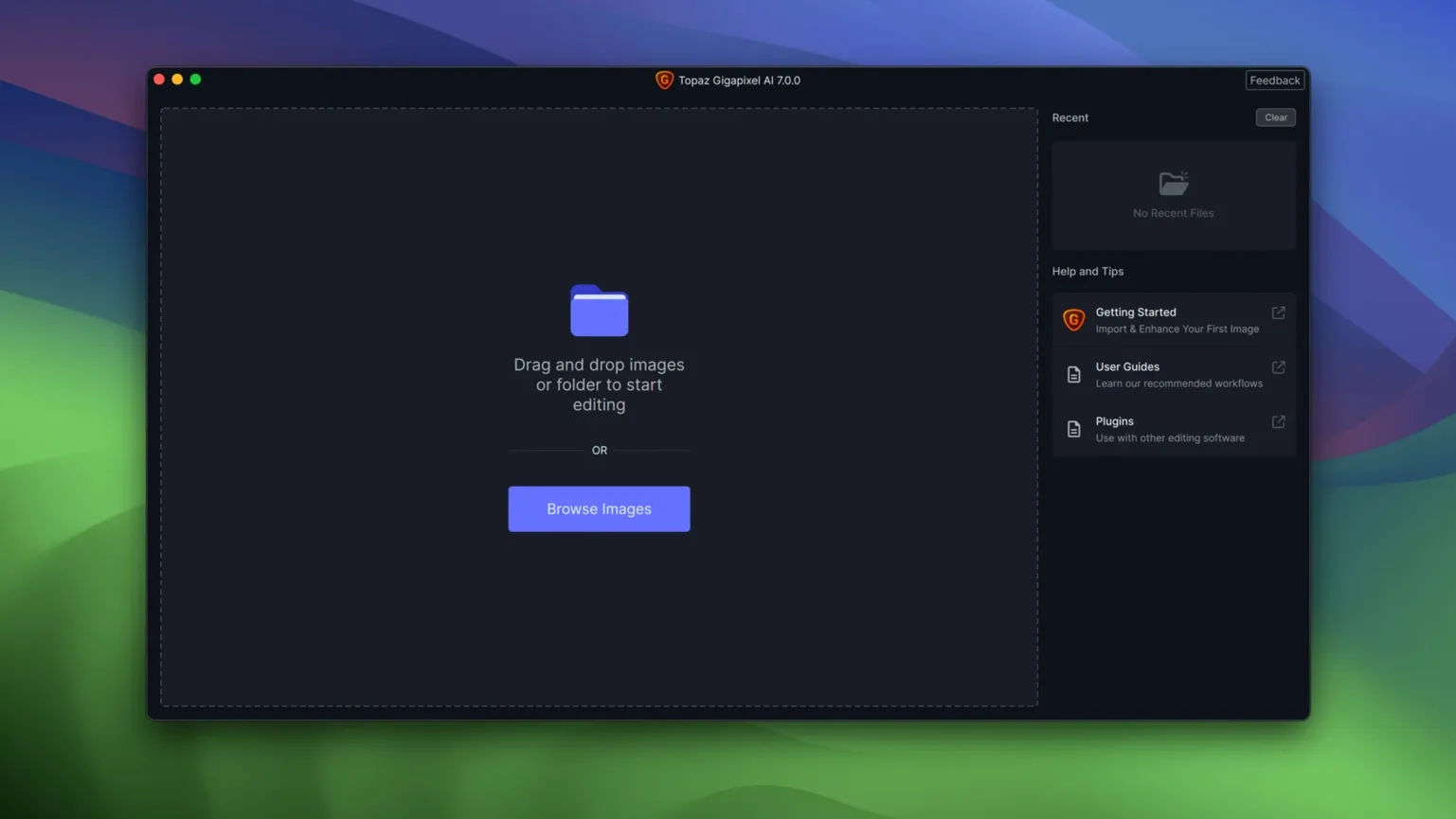
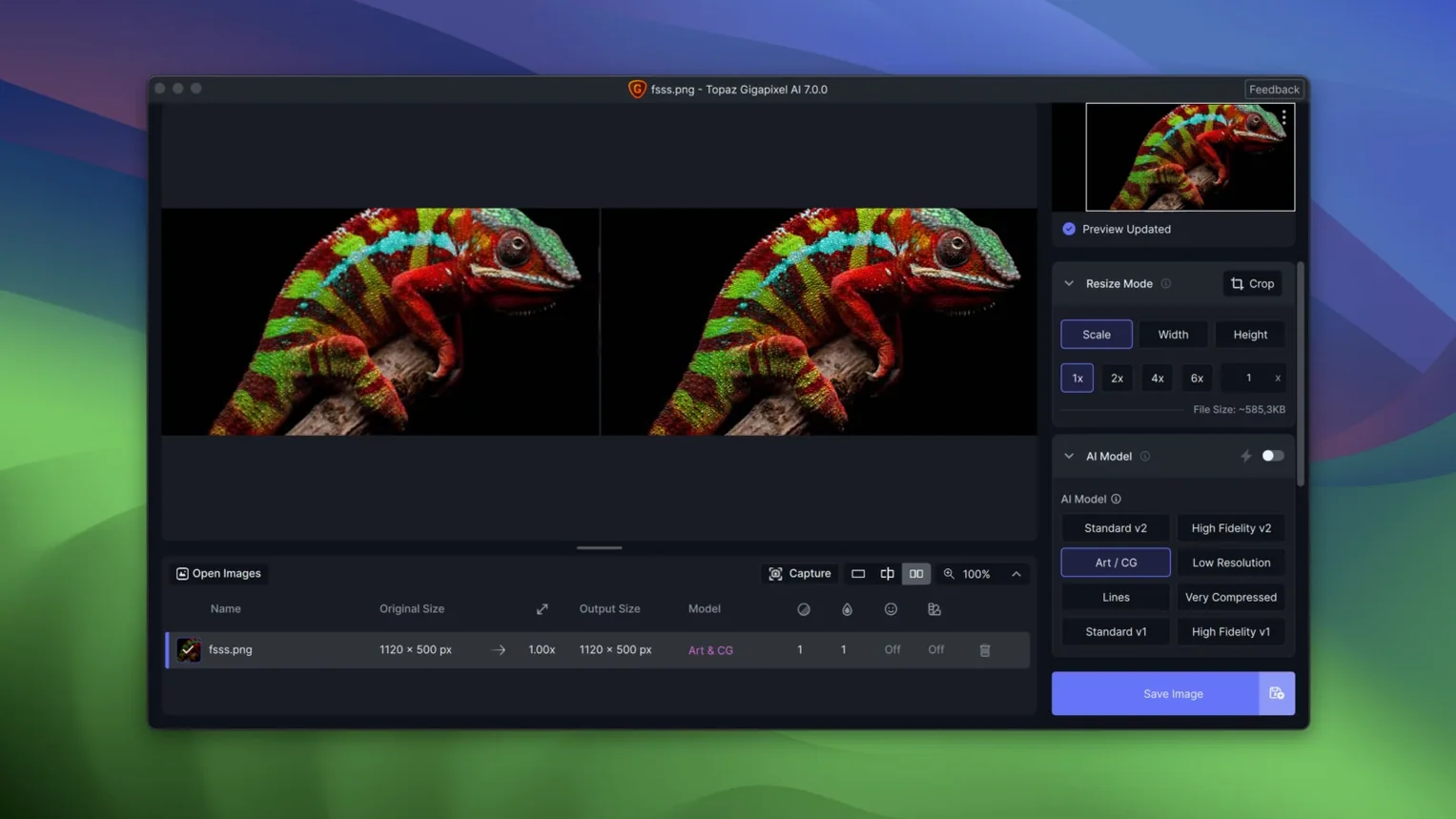
Photographers, archivists and anyone rescuing old or low-res images use Topaz Gigapixel AI. It is a desktop app that enlarges images without visible quality loss.
Can it restore an old family photo?
Yes. Drop in a scanned, faded portrait and the AI rebuilds lost detail. Faces sharpen, grain drops back, and the enlargement looks natural rather than pixelated.
What about line art or PNG graphics?
It handles them too. Ragged edges on low-resolution line art clean up well, and PNG artefacts soften without blurring hard lines.
Works on Intel and Apple Silicon Macs
Fits between Lightroom and your final file
Topaz Gigapixel AI sits alongside other image tools rather than replacing them. I keep it as a dedicated upscaling step. Send a photo out of Lightroom or Capture One, run it through Gigapixel, then bring the enlarged file back into your main editor for colour work or cropping. The app reads TIFF, JPEG and PNG files directly, so there is no format-conversion shuffle.
Batch processing is built in. Drag a folder of low-res headshots or scanned documents onto the queue and let the AI run through them overnight. Each file gets the same upscaling treatment, which saves clicking through images one at a time.
The result is a standard raster image that any Mac app will open. No proprietary wrapper, no sidecar files. You can stack it as a layer in Photoshop, add it to an Affinity project or drop it straight into InDesign. Because the upscaled image retains its colour space, you do not have to re-profile after export.
What happens on your Mac during install and use
The installer is a single .pkg file. Pick the architecture package that matches your Mac — ARM for Apple Silicon machines, x86 for Intel 64-bit. Double-click, follow the prompts, then open Patch.command and enter your Mac password once. That is it. The app sits in your Applications folder, no background service runs unless you launch it.
Topaz Gigapixel AI uses the GPU when it can. On Apple Silicon Macs it runs natively, so there is no Rosetta translation layer slowing things down. The AI models load into memory at start, which means the first image after launch takes a moment to begin processing. After that, each image in a batch starts faster because the model stays warm.
Never overwrites originals; no raw support
Will it overwrite my originals?
No. The app creates a new file for each upscaled image. Your original stays untouched in its folder.
Can I process raw files directly?
The app opens TIFF, JPEG and PNG. Most workflows convert raw files to one of those formats in Lightroom or Camera Raw before sending them to Gigapixel, so you do not lose the raw original.
Is it a plug-in or a standalone app?
Standalone. It does not install into Photoshop or any other host. That keeps the install simple and avoids plug-in conflicts when macOS updates.
Does it work with a proxy or networked drive?
Yes. Point it at a folder on a NAS or a shared volume. Processing may be slower over a network, but the app does not require files to live locally.
Can I use it on a Mac with multiple user accounts?
Yes. Install once with the admin account, and every user on that machine can launch the app. Each user sees their own recent files list and output folder.
Does it need an internet connection?
No. The AI models are part of the install package. No phone-home activation or model download is required.
What about high-DPI displays or external monitors?
The interface scales to match your display settings. On a 4K or 5K monitor the controls remain readable, and the preview area updates at full resolution.
Can I run it on an older macOS?
Minimum is macOS 12. Earlier versions lack the system libraries the AI models depend on. If you are on macOS 11 or older, the app will not start.
Yes. Version 1.3.5 runs on macOS 12 and newer on either architecture. The interface is English only.
No “what's new” for 1.4.0. The release line gave nothing I could check, and I will not stretch it into a changelog.
- macOS 12 or newer
- Intel or Apple Silicon
Questions people ask
What macOS version do I need?
macOS 12 or newer. The app runs on both Intel and Apple Silicon Macs.
Is Topaz Gigapixel AI the same as the newer Topaz Gigapixel?
No. This is the legacy product line that Topaz later replaced with a newer version called Topaz Gigapixel.
Staffroom comments 0
Sign in or create an account here to leave a comment.
Nobody has commented on this one yet.
Other Mac Apps tools
All Mac Apps tools-
 Topaz Video AI
1.7.2
1.6 GB
Mac Apps
-
 TouchDesigner
2025.31550Intel Macs only
615 MB
Mac Apps
-
 Typeface
4.5.1
23 MB
Mac Apps
-
 TablePlus
6.8.0
91 MB
Mac Apps
-
 Vector Magic
1.20Intel Macs only
17 MB
Mac Apps
-
 Sweet Home
7.5.7
356 MB
Mac Apps
-
 Super Vectorizer Pro
2.4.0
8 MB
Mac Apps
-
 Sublime Text
4.0
54 MB
Mac Apps