Steinberg SpectraLayers Pro 13.0.20 (macOS)
One download for Apple Silicon and Intel. Opens the install steps and mirrors.
- Version
- 13.0.20
- Size
- 3.9 GB
- Earliest macOS
- 12 or later
- CPU type
- Universal
- Updated
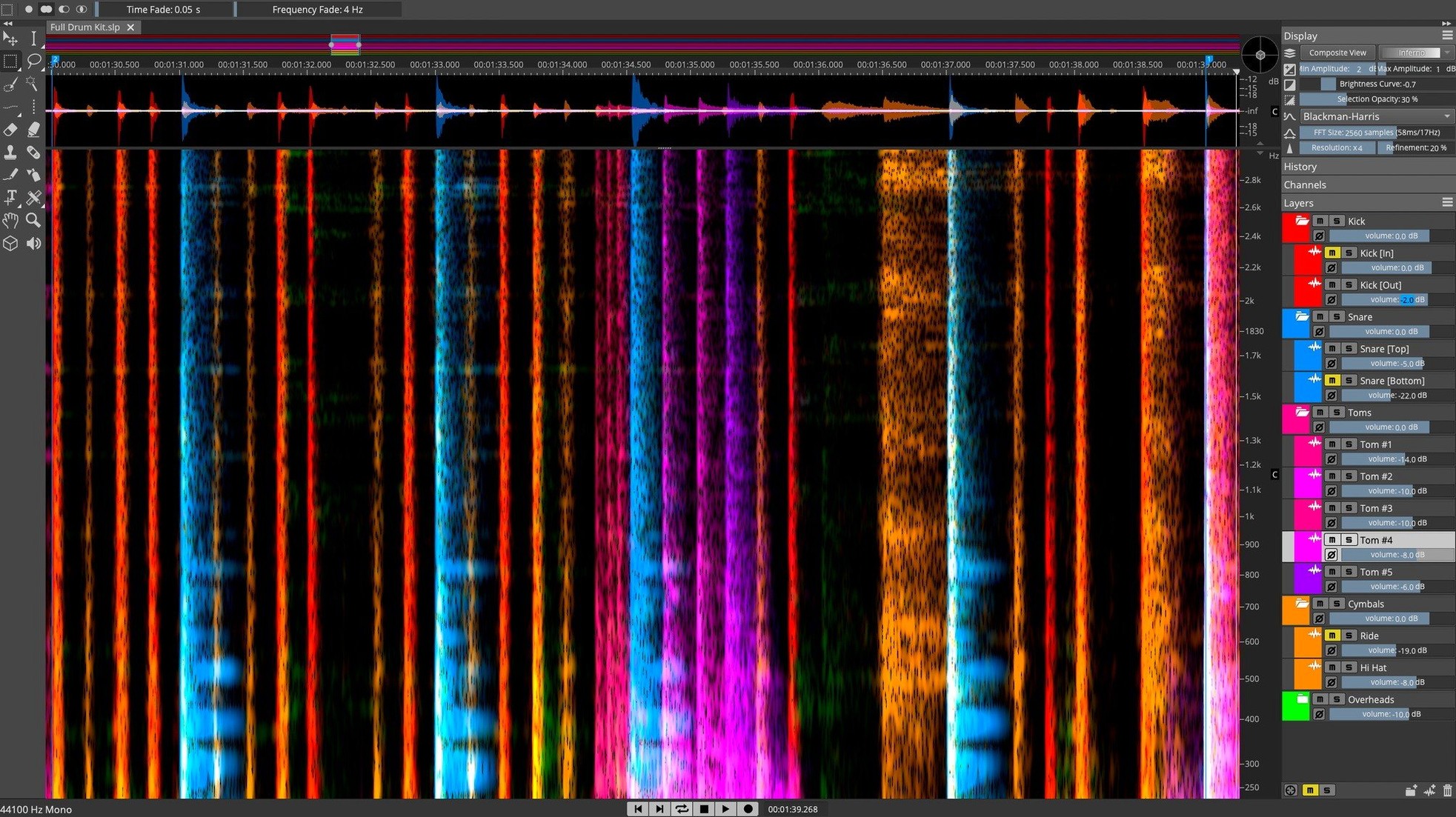
If you already work with spectral editing in other tools, SpectraLayers Pro 13 takes it further — direct spectral data editing, 3D visualisation, and AI-based component unmixing. Think of it as treating a mix like individual tracks, but at the waveform level.
Runs standalone and as VST, AAX, AU plug-in with ARA 2 in Cubase
Plugin format — VST, AAX, AU (despite the 'VST' category, it runs across all three as a plug-in, plus standalone).
ARA 2 integration — works inside Nuendo and Cubase for round-trip spectral editing without bouncing.
System — macOS 12 or later, Intel and Apple Silicon native.
Voice Denoiser and AI unmixing from a stereo mix
Voice Denoiser — isolates human voice from noise using spectral analysis, not just EQ.
Component unmixing — AI separates instruments and vocals from a stereo mix.
Direct spectral editing — paint, erase, or reshape audio in the frequency domain. 3D view helps spot artefacts invisible in a standard waveform.
Not a DAW replacement for arrangement and mixing
Will this replace a DAW? No. SpectraLayers Pro is a spectral editor, not a multitrack sequencer. You still do arrangement, mixing and mastering in Cubase, Logic or Pro Tools. What it replaces is the tedious bouncing back and forth when you need to fix a single breath, a resonant frequency, or separate a vocal from a noisy recording. You do the spectral work here, then bring the cleaned audio back into your DAW.
Does it need a Steinberg eLicenser or USB dongle? No. The Pro 13 version uses a standard activation file. No hardware key required. If you have installed other Steinberg software before, the activation process will look familiar.
Can a beginner use it? The learning curve is real — spectral editing is a different way of thinking about sound. Start with the presets and the automated processes before diving into manual edits.
Pattern Finder locates recurring clicks and rumbles
Pattern Finder — finds recurring sound events in the spectrum. If you need to locate every instance of a click or a room rumble across a long recording, this tool does the searching for you. Saves scanning through a whole file manually.
Manual and automatic de-essing — both methods are built in. The automatic one works well for standard sibilance, but the manual tool lets you target specific frequency bands where the sibilance sits, which matters when the vocal has unusual tone.
ARA 2 integration — when SpectraLayers Pro runs inside Nuendo or Cubase, edits appear in the DAW timeline without exporting or rendering. It is a genuine round-trip. If you use either of those hosts, the integration alone is worth the setup.
3D visualisation — not just a gimmick. The third axis (amplitude over frequency over time) makes it possible to spot noise floors and harmonic relationships that are invisible in a standard spectral waveform. Helpful when you are trying to isolate a quiet instrument sitting under a loud mix.
Works standalone or inside Logic, Pro Tools, Reaper, Digital Performer
ARA 2 aside, SpectraLayers Pro works as a standalone application or as a plug-in inside any host that supports VST, AAX or AU. That covers most DAWs — Logic Pro, Pro Tools, Reaper, Digital Performer — and makes the round-trip workflow possible even without ARA. You export a region, edit in SpectraLayers, and reimport. No format conversions needed if both applications use the same audio format.
On macOS, the application runs natively on both Intel and Apple Silicon. No Rosetta layer required for either architecture. If you keep your system on macOS 12 or later, there are no compatibility surprises. The disk image installs using the standard macOS installer procedure — no extra frameworks or background services.
For post-production engineers who work with dialogue and ADR, the Voice Denoiser and de-esser work well alongside iZotope RX or Accusonus ERA tools. SpectraLayers Pro handles the spectral separation; the others handle the broadband noise. They are complementary, not competing.
If you have used spectralayers crack or spectralayers torrent versions before, the Pro 13 installer is the same simple disk image format. No special steps needed beyond the usual macOS install.
- macOS 12 or later
- Intel or Apple Silicon
- Interface language: English
Staffroom comments 0
Sign in or create an account here to leave a comment.
Nobody has commented on this one yet.
Other VST Plugins tools
All VST Plugins tools-
 Sonic Academy KICK
1.1.8
358 MB
VST Plugins
-
 Superior Drummer
3.4.4
625 MB
VST Plugins
-
 Slate Digital Submerge
1.0.5
38 MB
VST Plugins
-
 Slate Digital Storch Filter
1.0.6
69 MB
VST Plugins
-
 T-RackS
6.3.2
2.3 GB
VST Plugins
-
 Serum
2.1.5
1.2 GB
VST Plugins
-
 Scaler 3
3.3.2
1.4 GB
VST Plugins
-
 Safari Pedals Everything Bundle
2026.05
628 MB
VST Plugins