
UJAM Symphonic Elements STRIIIINGS 1.3.1 (macOS)
One download for Apple Silicon and Intel. Opens the install steps and mirrors.
- Version
- 1.3.1
- Size
- 4.4 GB
- Earliest macOS
- 10.14 or later
- CPU type
- Universal
- Updated
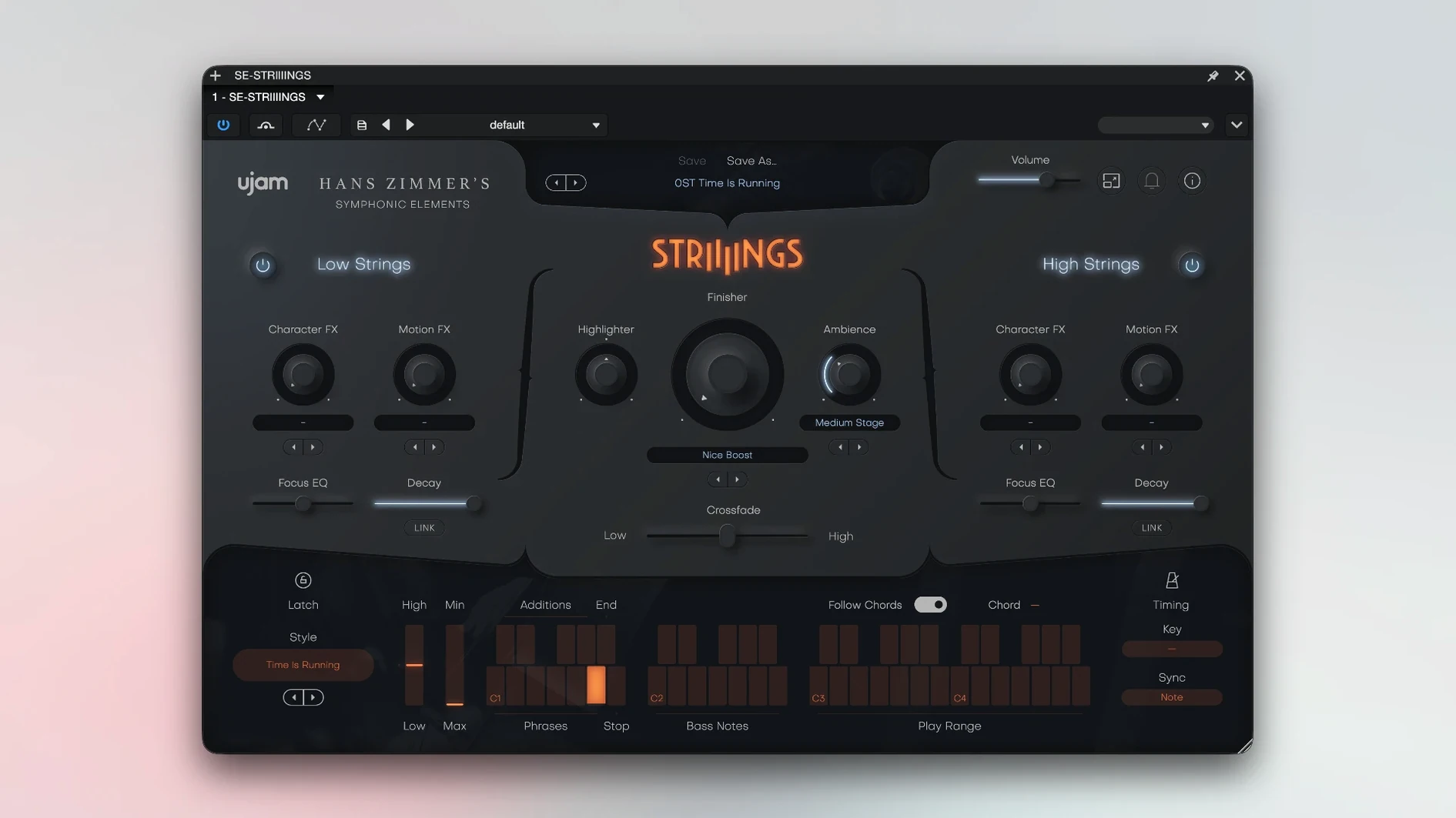
If you already work with UJAM’s beat-making tools, STRIIIINGS will feel familiar — but it is the first in their Symphonic Elements series, and it does a different job. Instead of drums or bass, you get a modern string-ensemble texture that sits somewhere between a traditional section and a sound-design pad.
Working with the two layers
The plug-in splits the orchestra into Low Strings and High Strings. High Strings covers violins and violas; the low layer handles the cellos and basses. Each section can be adjusted independently, which is where the real control comes in. You can push the low end for tension or let the high strings carry a melody.
Blending with the Crossfade
The Crossfade control blends the two sections. Pull it one way and you get a dark, weighty sound; the other way brings out the brightness of the violins. It is a simple way to shape the texture without diving into complex mixer routing.
Finding a style
There are 60 styles built in, covering a range of cinematic moods. A short workflow might go like this:
- Load STRIIIINGS on a track.
- Pick a style that fits the scene.
- Adjust the Crossfade to balance the low and high layers.
- Tweak the independent section levels if needed.
- Play — or trigger patterns from your DAW.
It works in most major DAWs — Ableton Live, Logic, Pro Tools, FL Studio, Cubase, Studio One, Bitwig, Reaper, and Reason. On a Mac, it runs on both Apple Silicon and Intel, from macOS Mojave 10.14 up to Tahoe 26, as long as your host is 64-bit.
Film, game, and beat composers all tap its cinematic palette
Film and game composers are the obvious fit — the 200-plus sound designer presets and the Hans Zimmer string source give you a ready-made cinematic palette. But beatmakers and electronic producers also get a lot from it. A string pad that can shift from dark and gritty to bright and airy with one fader saves time when you need atmosphere, not a literal orchestral arrangement. The 60 styles mean you can browse for a mood rather than building a sound from scratch, which suits the kind of session where a deadline is nearer than you would like.
Routes low and high strings to separate DAW bus channels
Inside a DAW, STRIIIINGS behaves like any other instrument plug-in — you route MIDI in, audio out. The two-layer approach means you can send the low and high strings to separate bus channels if your host supports multiple outputs, though the Crossfade control is usually enough on its own. On macOS, the plug-in sits in the standard VST3, AU or AAX locations, so your DAW finds it without extra hunting. It loads as a 64-bit plug-in only, which is normal for modern hosts, and works equally on Apple Silicon and Intel Macs. If you run other UJAM instruments, the interface style and workflow carry across, so switching between products takes no re-learning.
For anyone searching specifically, these terms might help: ujam symphonic elements striiiings, ujam symphonic elements chooir torrent, ujam symphonic elements chooir v1.3.0 u2b mac. The plug-in itself is version 1.3.1, K'ed by MORiA, and supports macOS 10.14 and later on both ARM and x86 architectures.
No “what's new” for 1.3.1. The release line gave nothing I could check, and I will not stretch it into a changelog.
- macOS 10.14 or later
- Apple Silicon or Intel
- 64-bit software only
- 4 GB RAM
Questions people ask
Can I adjust the high and low string sections separately?
Yes, each section can be adjusted independently, and the Crossfade control lets you blend between them.
Staffroom comments 0
Sign in or create an account here to leave a comment.
Nobody has commented on this one yet.
Other VST Plugins tools
All VST Plugins tools-
 UnderTone Audio UnFairchild
1.0.8
220 MB
VST Plugins
-
 Valhalla DSP Bundle
2025.12
61 MB
VST Plugins
-
 VocalNet
1.0.4
669 MB
VST Plugins
-
 WaveLab Pro
13.0.30
VST Plugins
-
 XLN Audio Life
1.2.3
442 MB
VST Plugins
-
 XLN Audio XO
1.8.10
2.3 GB
VST Plugins
-
 Xpand!2
2.3.1
1.2 GB
VST Plugins
-
 T-RackS
6.3.2
2.3 GB
VST Plugins