WaveLab Pro 13.0.30 (macOS)
One download for Apple Silicon and Intel. Opens the install steps and mirrors.
- Version
- 13.0.30
- Earliest macOS
- 13 or later
- CPU type
- Universal
- Updated
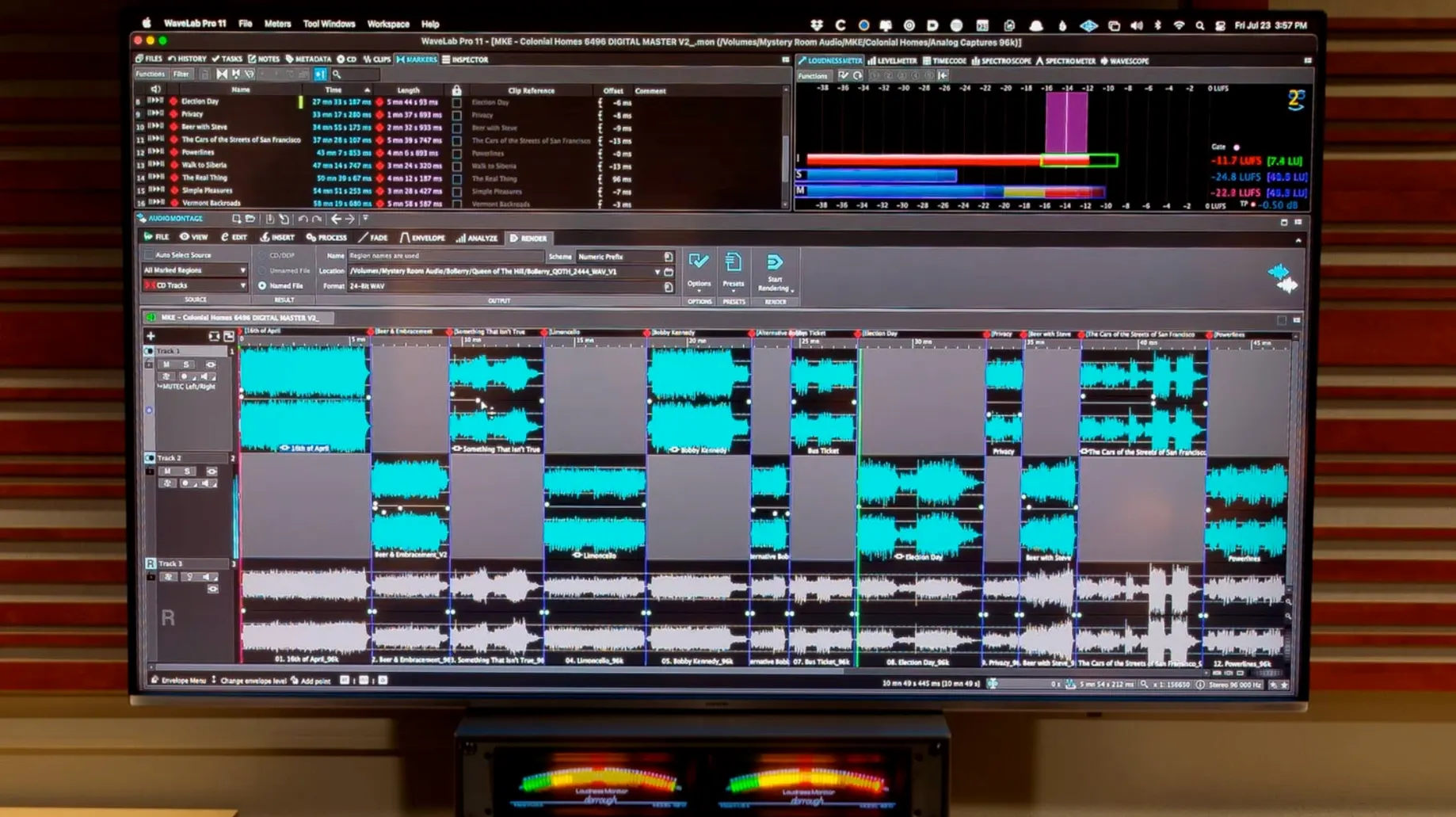
WaveLab Pro sits in that part of a session where tracks become the finished product. If you know Cubase for composing or Nuendo for post, this is the dedicated mastering desk — the equivalent of moving from the control room to the mastering suite. It handles the final assembly, restoration, loudness management and format export that DAWs start but rarely finish well.
Mastering with Dolby Atmos and audio restoration
- Master montages with Dolby Atmos channel-based surround files and binaural monitoring (HRTF profiles supported).
- Audio restoration work — declicking, denoising, spectral editing — without leaving the app.
- Transferring audio ranges between applications, with or without effects, so you can bounce a stem and keep processing intact.
- Working as a VST plug-in inside a compatible DAW when the session needs WaveLab’s analysis tools.
English-only interface on macOS 13+ with learning curve
- The interface is English only.
- Runs on macOS 13 and later; supports both Apple Silicon and Intel 64-bit.
- A full mastering solution, not a lite editor — the learning curve matches the feature set.
Dropping in a mix and seeing peaks automatically
I bring a mix into WaveLab for some final work. The first thing is to drop the file into the audio editor. The waveform appears, automatically scaled so you can see peaks without hitting a zoom key. From there I check for clicks or noise. The spectral editor opens alongside the waveform view; a quick scan shows a few high-frequency artefacts. I mark the first one, apply restoration, and move on. Once the file is clean, I build a master montage. The montage holds the track order, the gaps, the fades. I can try a limiter or EQ across the whole thing, and listen. When it sounds right, the export stage handles the loudness standard I need — no separate batch tool required.
A specific workflow — cleaning up a location recording
Suppose you have a dialogue take recorded in a hotel room. The HVAC hum is constant, there's a door slam, and the level is uneven. In WaveLab I open the file, highlight a section of pure noise, and run the denoiser. The noise floor drops. For the door slam I switch to the spectral editor, select the frequencies, and apply a spectral delete. The lick of a coffee cup next — a short click. The declicker catches it. Finally I use the montage to set a consistent loudness across the whole file, then export as a broadcast WAV. The whole job stays in one window. No bouncing between tools.
Sorting audio restoration snags without leaving the app
Montage and file synchronisation
A recorded mix doesn't match the montage timeline. Check the synchronisation options. WaveLab can lock the file and montage navigation together. Turn that on and both views follow the same cursor. Saves a lot of scrolling and guessing.
Transfer to another DAW
You want to send a stem over to Cubase or Reaper with processing applied. Instead of printing and importing, use the audio range transfer. Select the range, copy, and paste into the DAW. The effect chain comes with it. Works with or without the plug-in version installed.
Dolby Atmos monitoring sounds wrong
If you load a personal HRTF profile and the binaural mix doesn't match your room, check the HRTF file. WaveLab supports personal profiles. If it still sounds off, try a different HRTF preset. The feature is new in 13.0.30 so it's worth reading Steinberg's docs on the expected format.
- Dolby Atmos master montages can include channel-based surround files.
- Dolby Atmos binaural monitoring supports loading a personal HRTF profile.
- macOS 13 or later
- Apple Silicon or Intel 64-bit processor
Staffroom comments 0
Sign in or create an account here to leave a comment.
Nobody has commented on this one yet.
Other VST Plugins tools
All VST Plugins tools-
 VocalNet
1.0.4
669 MB
VST Plugins
-
 Valhalla DSP Bundle
2025.12
61 MB
VST Plugins
-
 XLN Audio Life
1.2.3
442 MB
VST Plugins
-
 XLN Audio XO
1.8.10
2.3 GB
VST Plugins
-
 Xpand!2
2.3.1
1.2 GB
VST Plugins
-
 UnderTone Audio UnFairchild
1.0.8
220 MB
VST Plugins
-
 UJAM Symphonic Elements STRIIIINGS
1.3.1
4.4 GB
VST Plugins
-
 T-RackS
6.3.2
2.3 GB
VST Plugins