
Xpand!2 2.3.1 (macOS)
- Version
- 2.3.1
- Size
- 1.2 GB
- Earliest macOS
- 13 or later
- CPU type
- Apple Silicon
- Updated
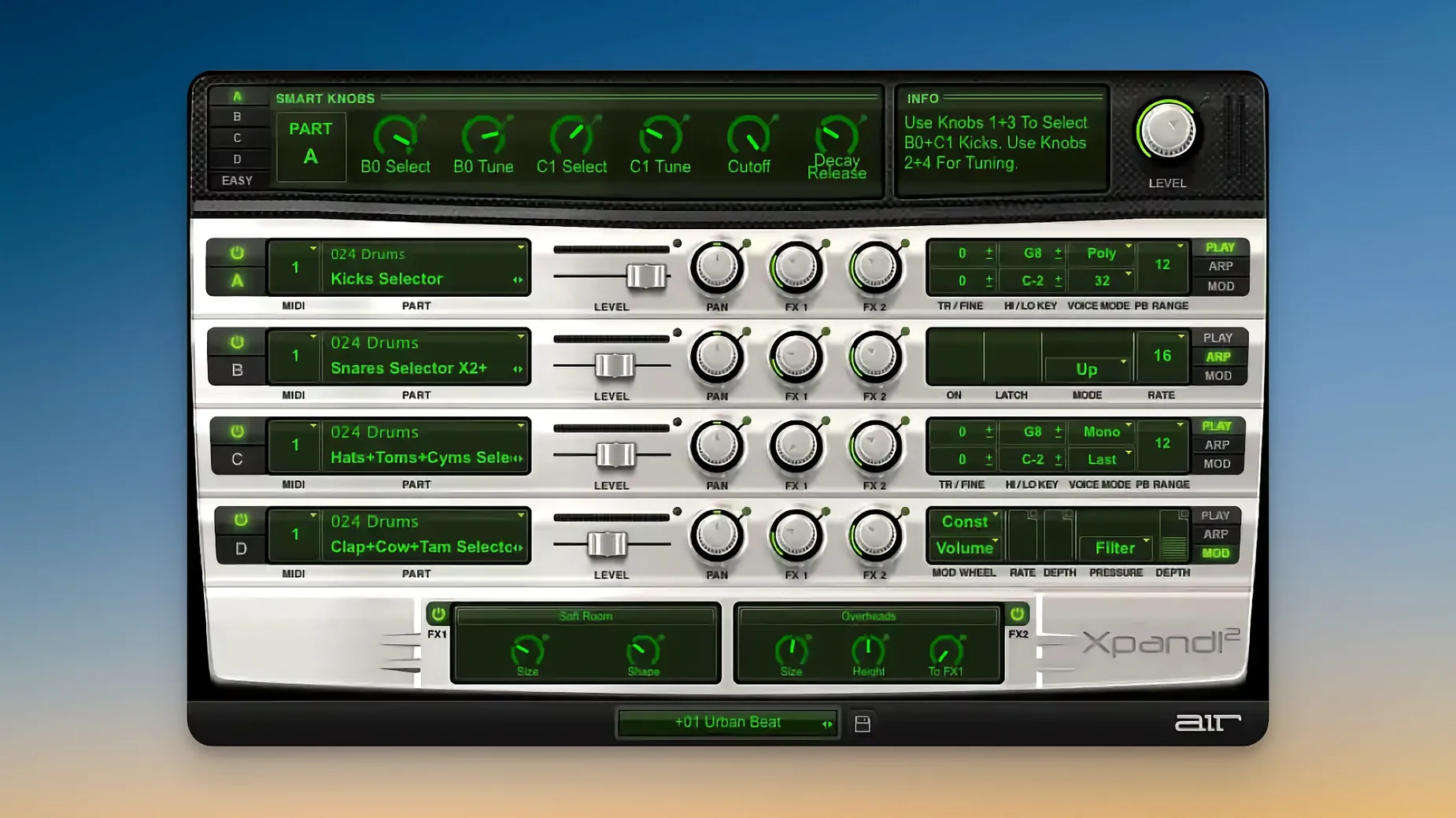
A single instrument that does the work of four. Xpand!2 from AIR Music Technology is a multitimbral virtual instrument plugin that layers up to four independent sounds in one patch. Each slot runs on its own MIDI channel, with its own note range, mix, arpeggiator, modulation, and effects chain. That makes it useful when you need a layered pad, a split keyboard, or a quick multitimbral setup without loading four separate instances.
- Four active sound slots per preset, each with individual MIDI channel, note range, arpeggiator, and effects
- More than 2,500 presets across 29 categories
- 50 built-in effects including reverb, delay, chorus, and the Chaos Delay
- Six smart controls for fast sound editing; supports Pitch Bend, Aftertouch, and MIDI Learn
- Monophonic parts can use First, Last, Highest, or Lowest voice priority
- Native Apple Silicon support and HiDPI/Retina display compatibility
Build cue beds with four sounds in one instance
The obvious fit is the composer working to a deadline. If you regularly build cue beds or backing tracks, having four sounds ready in one instance saves both screen space and CPU. A single Xpand!2 preset can hold a chord pad on channel 1, a bass on channel 2, a pluck on channel 3, and a riser on channel 4. Drop that into a session and you have the bones of a piece in one track.
Live performers also benefit. Because each slot listens on its own MIDI channel, a keyboard split across a lower and upper register becomes straightforward. Layer a sustained pad over a lead patch, or map an arpeggiated figure to the right hand while the left holds a bass. It removes the need for a second laptop or a hardware module.
Sound designers who layer textures will appreciate the per-slot arpeggiator and modulation. You can run a wavetable drone in one slot, a sample-based hit in another, and an FM tone in a third, each with independent filtering and envelope shaping. The six smart controls let you adjust all four slots at once without diving into sub-menus.
Each slot defaults to the same MIDI channel
The most frequent error is forgetting that each slot defaults to the same MIDI channel. If you load a preset and hear only one sound, check your slot routing. Each part needs its own channel or note range to play independently.
Another slip is treating all four slots as polyphonic by default. The polyphonic mode allows up to 64 voices, which is generous, but it also consumes more processing. If you only need a monophonic lead, switch the slot to mono and pick a voice priority — First or Last usually work best for legato lines. Leaving everything on poly can bog down older systems unnecessarily.
Beginners also overlook the note range settings. Without range limits, two slots may fight for the same keys. Setting a sensible split — for example, slot 1 plays C2 to C4 and slot 2 plays C4 to C6 — avoids overlap and makes the patch playable on a standard keyboard controller.
Verse pad, chorus layer, and bass from one preset
I opened Xpand!2 inside a new Logic project, targeting a pop arrangement that needed a verse pad, a chorus layer, and a bass. The browser's 29 preset categories helped narrow the search. I landed on a preset called "Dark Spread" from the Pads section, loaded it, and started auditioning each slot.
Slot 1 held a slow atmospheric pad on MIDI channel 1. I lowered its octave range to C2–C4 so it sat below the vocal line. Slot 2 was a brighter texture, so I nudged its note range up an octave and switched its voice mode to poly. Slot 3 was a sub-style bass, which I limited to monophonic with Lowest priority, mapped to channel 3. Slot 4 I left empty for now.
I assigned each slot its own track in the sequencer, then routed the MIDI output from three tracks to the single Xpand!2 instance. The three parts played together without overlapping because their note ranges and MIDI channels were distinct.
For the chorus, I duplicated the track, swapped the preset to a more energetic patch called "Riser Stack", and adjusted the smart controls to brighten the overall mix. The arpeggiator on slot 2 added movement. The whole setup took under five minutes, and I had a layered instrumental section ready without touching a single third-party reverb or compressor.
It runs on macOS 13 or later. The plugin interface is English only. Install and activation instructions are included with the package.
No “what's new” for 2.3.1. The release line gave nothing I could check, and I will not stretch it into a changelog.
- macOS 13 or later
- Apple Silicon
- Interface language: English
Staffroom comments 0
Sign in or create an account here to leave a comment.
Nobody has commented on this one yet.
Other VST Plugins tools
All VST Plugins tools-
 XLN Audio XO
1.8.10
2.3 GB
VST Plugins
-
 XLN Audio Life
1.2.3
442 MB
VST Plugins
-
 WaveLab Pro
13.0.30
VST Plugins
-
 VocalNet
1.0.4
669 MB
VST Plugins
-
 Valhalla DSP Bundle
2025.12
61 MB
VST Plugins
-
 UnderTone Audio UnFairchild
1.0.8
220 MB
VST Plugins
-
 UJAM Symphonic Elements STRIIIINGS
1.3.1
4.4 GB
VST Plugins
-
 T-RackS
6.3.2
2.3 GB
VST Plugins