
XLN Audio XO 1.8.10 (macOS)
One download for Apple Silicon and Intel. Opens the install steps and mirrors.
- Version
- 1.8.10
- Size
- 2.3 GB
- Earliest macOS
- 10.13 or later
- CPU type
- Universal
- Updated
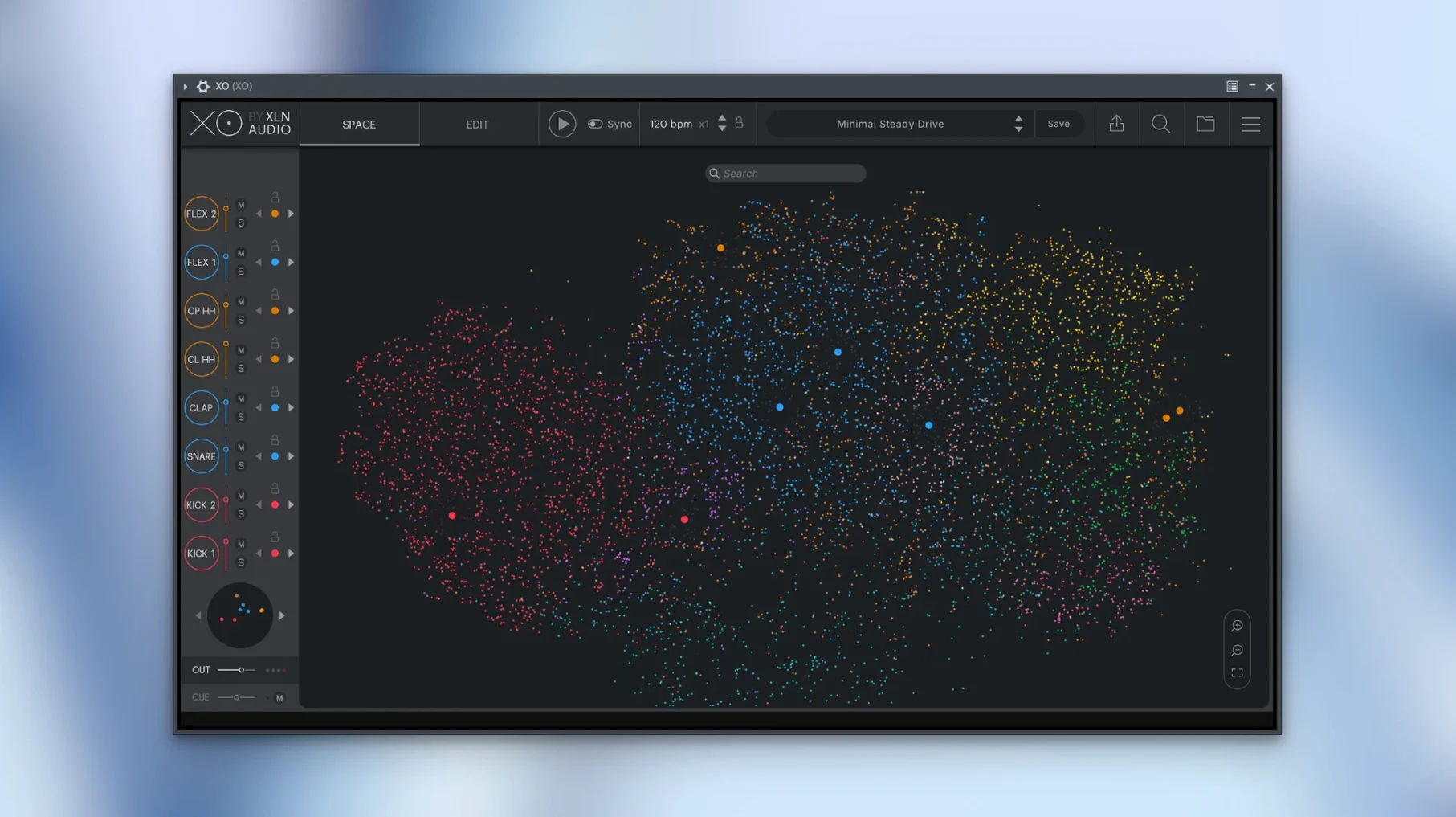
Finding the right drum sample across thousands of files eats time. XO solves that by laying out your whole library in a visual space where similar sounds cluster together. Click once, and you hear what fits.
Browses drum samples and builds beats in one plugin
- Drum sample browsing and beat making in one plugin
- Standalone use outside a DAW
- Exporting MIDI or audio straight into your project
- Quick replacement of a sound with Hot Swap
- Adding Accentuator to shape the transient character
Runs on macOS 10.13 or later, Intel and Apple Silicon
- Available as VST, AU, and AAX — works in most hosts
- macOS 10.13 or later, Intel and Apple Silicon both supported
- English interface only
- Version 1.8.10 fixed a rare slow start-up issue
Groove Templates let you drag ready-made rhythms onto pads
XO has a few features that aren't obvious from the main window but change how you work day to day. They are easy to miss.
- Groove Templates — XO includes these as ready-made rhythmic patterns. You drag one onto the sequencer and get a beat that works without tweaking every step. Useful when you want a quick foundation.
- Playground mode — turns the interface into a free-form area. No grid, no sequence running. You click pads and hear sounds in any order, which helps when you are just hunting for a tone or building a loop by ear.
- Hot Swap looks simple but saves time in practice. If a kick sounds wrong in your pattern, you click it and browse the XO Space. The new sample slots in without you rebuilding the sequence.
- Accentuator sits on each sound and changes its attack and decay character. Not a full EQ or compressor — more like a sculpting tool for the transient. Quick to dial in.
- MIDI export with muted lanes — version 1.8.10 fixed this. If you mute a lane in the sequencer and export MIDI, the muted notes stay muted in the file now. Small detail, but it matters if you send patterns to a DAW for further editing.
Finds a hi-hat in XO standalone without scrolling folders
You have a session open in Live. You need a hi-hat pattern but do not want to scroll through a folder of 200 closed hats. You open XO standalone, find a hat you like, and click the XO Space to see similar ones clustered around it. You pick three that sit close together — they sound related, so they will mix without clashing. You drag the MIDI pattern from XO into a Live track, swap one of the hats with Hot Swap, and adjust the Accentuator to make it sit further back in the mix. From sample search to finished loop, it takes under a minute. You never left the mouse in a file browser.
Opens only its own 8,700 built-in one-shots, not your sample library
Can XO open my own sample library, or only its own sounds?
XO ships with over 8,700 one-shot samples and 240 presets built in. It browses and sorts those by similarity. The official documentation describes the visual browser as working with its included content. If you rely entirely on your own collection, you will still find the sequencer and export useful, but the similarity map works best with the library it is designed for.
Does the sequencer record what I play live, or do I have to click everything in?
The sequencer is a step-based pattern editor — you place hits on a grid. It does not record MIDI input in real time. You build beats by clicking lanes, adjusting velocity, and dragging patterns. That works well for programming drum parts rather than playing them live.
Can I use XO in Logic, Cubase, or Pro Tools?
Yes. It ships as VST, AU, and AAX. The AU version loads in Logic. VST covers most other hosts. AAX works in Pro Tools. The same installer includes all three formats, so you do not need separate downloads.
Does XO run on Apple Silicon natively?
The architecture is listed as both ARM and x86 64-bit. That means it runs on Intel Macs and Apple Silicon Macs. On an M-series machine, it should open without Rosetta translation needing extra steps.
No “what's new” for 1.8.10. The release line gave nothing I could check, and I will not stretch it into a changelog.
- macOS 10.13 or later
- Intel or Apple Silicon
- English language
Questions people ask
Can XO run without a DAW?
Yes, XO includes a standalone mode in addition to its VST, AU, and AAX plugin formats.
Staffroom comments 0
Sign in or create an account here to leave a comment.
Nobody has commented on this one yet.
Other VST Plugins tools
All VST Plugins tools-
 XLN Audio Life
1.2.3
442 MB
VST Plugins
-
 Xpand!2
2.3.1
1.2 GB
VST Plugins
-
 WaveLab Pro
13.0.30
VST Plugins
-
 VocalNet
1.0.4
669 MB
VST Plugins
-
 Valhalla DSP Bundle
2025.12
61 MB
VST Plugins
-
 UnderTone Audio UnFairchild
1.0.8
220 MB
VST Plugins
-
 UJAM Symphonic Elements STRIIIINGS
1.3.1
4.4 GB
VST Plugins
-
 T-RackS
6.3.2
2.3 GB
VST Plugins