
Cockos REAPER 7.4.8 (macOS)
One download for Apple Silicon and Intel. Opens the install steps and mirrors.
- Version
- 7.4.8
- Size
- 57 MB
- Earliest macOS
- 10.15 or later
- CPU type
- Universal
- Updated
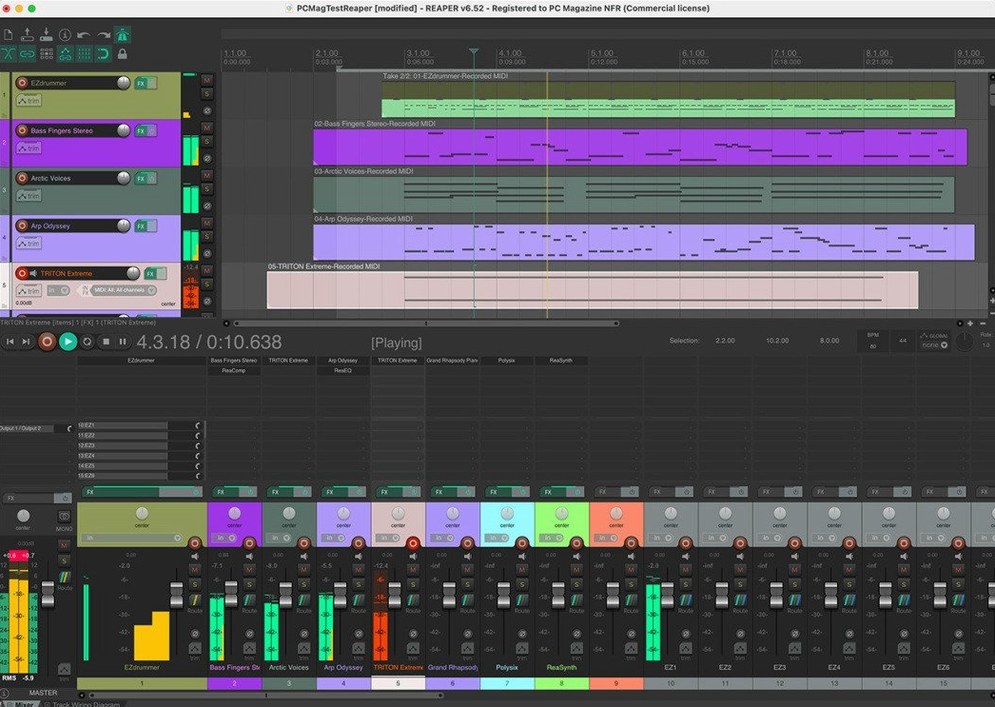
Studio engineers, podcast editors, band recordists and composers all end up here sooner or later. REAPER is the DAW that handles a solo vocal take the same way it handles an orchestra session with hundreds of routed channels.
Check it runs first
macOS 10.15 Catalina is the floor. Both Apple Silicon and Intel Macs are covered by the universal installer.
Record and arrange
Multitrack audio and MIDI recording sit next to editing, processing and mixing tools. Child tracks route into folders automatically, and folder output can be frozen to bake in drum processing without committing.
Route and extend
Up to 512 remappable audio hardware channels in and out. Import audio and MIDI, script the app, or bolt on plugins and hardware REAPER has no business supporting this well.
REAPER sits in a lane that few other DAWs bother with. Compared to Logic Pro, it stays leaner on disk and starts faster from a cold boot. Logic ties you to Apple's plugin format and its own bundled instruments; REAPER can be extended, scripted and modified, which means you can swap out the whole workflow if the stock layout does not suit you. Compared to Ableton Live, REAPER lacks the session-view clip launching that electronic musicians rely on, but it makes up for it with serious routing depth and no artificial limits on track count or bus structure. Pro Tools users will recognise the folder-based group routing and the lack of track-type restrictions — no instrument, audio or bus type locked to a lane, just a track and whatever you drop on it.
Hardware insert and sample rate fixes
Version 7.4.8 brought fixes that matter if you work with hardware inserts or unusual sample rates. The developer notes mention corrections to automation lane behaviour and rendering with certain third‑party plugins. For daily use, the change that stands out is improved stability when REAPER re‑opens a project that uses loopback audio channels — a scenario that used to produce a blank preferences panel. None of the recent updates rewrote the interface or broke a workflow, which is the quiet kind of reliability a busy studio needs.
Loading a week‑old band project
I open REAPER on a project that has been sitting for a week: a four‑piece band recording with overheads, direct‑input bass and a vocal mic. REAPER loads the project and shows the twelve tracks I left. The folder track for the drum bus is still collapsed, and the child tracks route into it automatically — no manual patching needed after a restart. I add a new track for a scratch keyboard part, arm it for MIDI recording and pick a soft synth from the FX browser. The latency feels consistent with the buffer I set last time.
For editing, I split a vocal take where the singer clicked the microphone. REAPER handles the split and crossfade without leaving a gap in the waveform. I use the mouse to drag the corrected clip into place, and the snap grid keeps it aligned. For a quick mix pass, I open the mixer panel, pull down the drum folder fader by three dB and send the bass to a bus with compression. The whole session stays under 5% CPU on a modest machine — no freezes needed. When I am ready to bounce, I set the render range, choose WAV at 44.1 kHz and let REAPER write the mixdown while I grab tea. It finishes before I sit back down.
The same session could be a podcast edit or a film score sketch. REAPER does not force you into a layout or a contract — just tracks, a timeline and the routing you choose. A reaper mac torrent will get you the same installer; the app itself is small enough to download quickly and start working within minutes.
No “what's new” for 7.4.8. The release line gave nothing I could check, and I will not stretch it into a changelog.
- macOS 10.15 or later
- Apple Silicon and Intel
- English interface
Staffroom comments 0
Sign in or create an account here to leave a comment.
Nobody has commented on this one yet.